Skip to main content Skip to main navigation
Australian Public Service Academy Australian Public Service Academy Australian Public Service Academy Australian Public Service Academy logo

APSLearn logo

APSLearn Login

APS Professions logo
Professions MCP Portal

Main navigation

  • APS Craft

    APS Craft

    • Integrity
    • Working in Government
    • Engagement & Partnership
    • Implementation & Services
    • Strategy, Policy & Evaluation
    • Leadership & Management
  • APS Professions

    APS Professions

    • Complex Project Management Profession
    • Data Profession
    • Digital Profession
    • Evaluation Profession
    • HR Profession
    • Procurement and Contract Management Profession
  • APS People

    APS People

    • Diversity and Inclusion
    • Health and Wellbeing
    • Work Health and Safety
    • Your APS Career
  • APS Induction
  • Learning Experiences

    Learning Experiences

    • Courses
    • Course session dates
    • Microcredentials
    • Events
    • Resources
    • Cross Agency Training Hub
    • Nationwide course sessions
    • SES Executive Coaching
  • Our Services

    Our Services

    • APSLearn
    • APS Academy course offerings
    • APS Academy Training Venues
    • Onboard learning experiences
    • Share and reuse learning experiences
  • Guides

    Guides

    • APS L&D Good Practice Guide
    • Learning Design and Administration
    • Learning Culture
    • The Learner and Career Development
    • Learning Technologies
    • Procurement in L&D
    • Evaluating Learning
    • L&D Search
    • Content Strategy Guide
  • News

    News

    • Academy News
    • MyAcademy
  • About us

    About us

    • About the APS Professions
    • Faculty
    • Learning approach
    • Contact
    • Supplier FAQ's

Choose and configure your CMS

You are here

  1. Home
  2. Guides
  3. Content Strategy Guide
  4. Choose and configure your CMS
  • Linkedin
  • Twitter
  • Facebook
  • Email
Print

Guides

  • APS L&D Good Practice Guide
  • Learning Design and Administration
  • Learning Culture
  • The Learner and Career Development
  • Learning Technologies
  • Procurement in L&D
  • Evaluating Learning
  • L&D Search
  • Content Strategy Guide
    • Understand your content ecosystem
    • Start a content strategy
    • Identify business needs
    • Define user content needs
    • Audit content
    • Set goals and measure success
    • Set up your governance
    • Remove Content
    • Improve your IA
    • Define your SEO strategy
    • Choose and configure your CMS
    • Manage content requests

A content management system (CMS) is a tool that helps you manage content all in one place. Learn how to choose the best CMS for your purposes and get the most out of it.


The role of a CMS in the content ecosystem


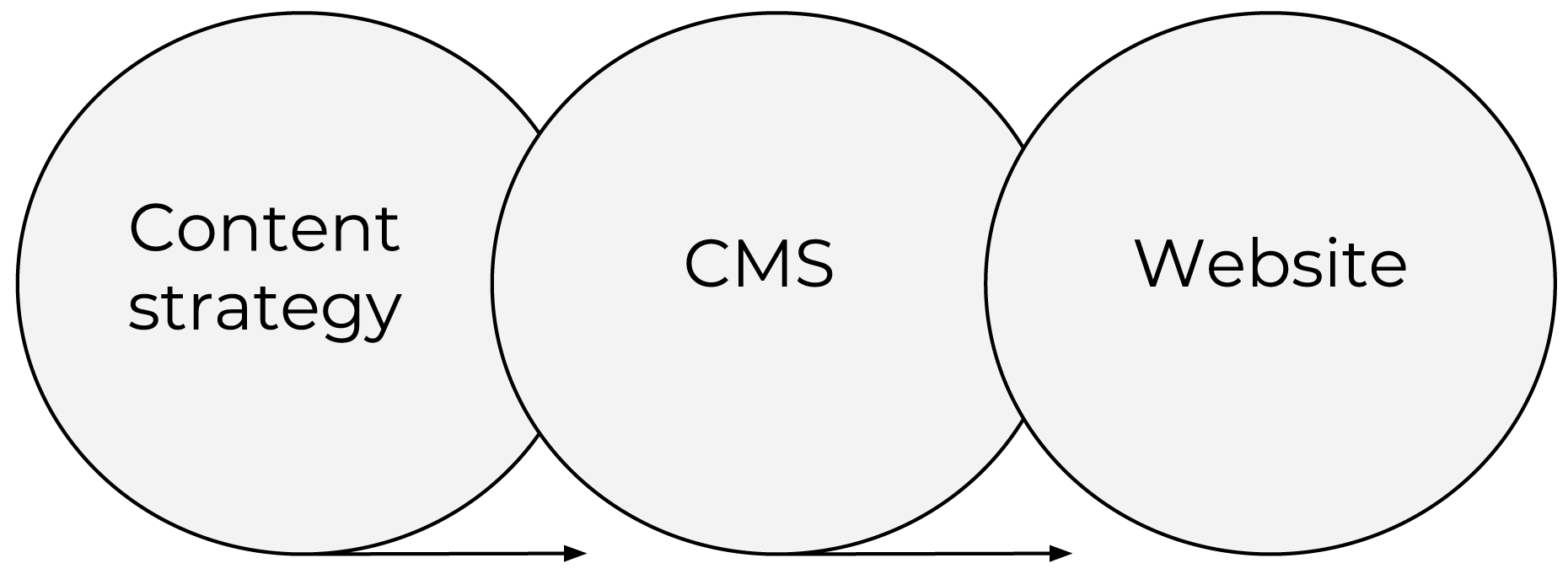
Your CMS fits between your content strategy and your website. It’s the middle ground where you can manage your content lifecycle. This includes content creation, editing, approvals, publishing, improving, maintaining and removing

  • The content strategy determines the information that needs to be created for use on your website.
  • The CMS helps to manage the process of getting the content onto your website.
  • The website uses the published content in the CMS and presents it to your users.
Diagram showing the relationship between content strategy, a content management system (CMS) and a website. Three overlapping circles are labelled "Content strategy", "CMS" and "Website", illustrating how content planning, content management technology and website delivery are interconnected components of a digital content ecosystem.

Your CMS fits between your content strategy and your website

Why use a CMS?

A content management system, as its name suggests, makes it easier to create, manage, store and work with your content. It also supports things like content workflow, lifecycle, and user roles (content creators, editors, approvers, publishers).

Gather CMS requirements

Understand your CMS requirements so you can choose the best system for your purposes.

Configure your CMS

Learn how to make your CMS work for you. The way you set up a CMS will affect how you can use it to manage your content.

What you'll get

  • An understanding of how to choose a CMS
  • An understanding of how to optimise and configure a CMS
  • A CMS requirements checklist

What to do

Add to Part 8 in the Content Strategy Template

Analyse and discuss CMS requirements with your development team

← Do before: Define your search engine optimisation (SEO) strategy

Set the foundations phase

Do next: Manage content requests →

Create user-centred content phase

L&D Groups
Set the foundations
L&D Categories
Content Strategy Guide
Was this page helpful?
Last updated
28 September 2026

Acknowledgement of Country

The APS Academy acknowledges the Traditional Custodians of Country throughout Australia and recognises the continuing connection to lands, waters and communities.
We pay our respect to Aboriginal and Torres Strait Islander cultures and to Elders both past and present.

Museum of Australian Democracy
Old Parliament House 
Parkes 2600

APSLearn terms & conditions

About us

apsacademy@apsc.gov.auContact us
ABN: 99 470 863 260 
  • LinkedIn - external site - external site - external site

Help us improve

We are always looking for ways to improve the user experience of our website

 Share your thoughts

  • © 2021 APS Academy. All rights reserved.
  • FOI
  • Privacy Policy 
  • Terms of use
  • Accessibility
Back to top