Skip to main content Skip to main navigation
Australian Public Service Academy Australian Public Service Academy Australian Public Service Academy Australian Public Service Academy logo

APSLearn logo

APSLearn Login

APS Professions logo
Professions MCP Portal

Main navigation

  • APS Craft

    APS Craft

    • Integrity
    • Working in Government
    • Engagement & Partnership
    • Implementation & Services
    • Strategy, Policy & Evaluation
    • Leadership & Management
  • APS Professions

    APS Professions

    • Complex Project Management Profession
    • Data Profession
    • Digital Profession
    • Evaluation Profession
    • HR Profession
    • Procurement and Contract Management Profession
  • APS People

    APS People

    • Diversity and Inclusion
    • Health and Wellbeing
    • Work Health and Safety
    • Your APS Career
  • APS Induction
  • Learning Experiences

    Learning Experiences

    • Courses
    • Course session dates
    • Microcredentials
    • Events
    • Resources
    • Cross Agency Training Hub
    • Nationwide course sessions
    • SES Executive Coaching
  • Our Services

    Our Services

    • APSLearn
    • APS Academy course offerings
    • APS Academy Training Venues
    • Onboard learning experiences
    • Share and reuse learning experiences
  • Guides

    Guides

    • APS L&D Good Practice Guide
    • Learning Design and Administration
    • Learning Culture
    • The Learner and Career Development
    • Learning Technologies
    • Procurement in L&D
    • Evaluating Learning
    • L&D Search
    • Content Strategy Guide
  • News

    News

    • Academy News
    • MyAcademy
  • About us

    About us

    • About the APS Professions
    • Faculty
    • Learning approach
    • Contact
    • Supplier FAQ's

Card sorting

You are here

  1. Home
  2. Learning Experiences
  3. Resources
  4. Card sorting
  • Linkedin
  • Twitter
  • Facebook
  • Email
Print

Card sorting will help to find the best way to group content for your information architecture (IA). In a card sorting session, you’ll find out what information makes sense to your users.

Why do a card sort?

Card sorting helps to:

  • group items to form your IA
  • understand how users would categorise labels
  • decide whether to make your IA subject-based, task-based or based on user types

There are different types of card sorting activities. In each instance, you will create the cards first but you or your users may add to them during the process.

Open

This involves users sorting the cards into groups. There are no limits on the open card sort. New cards can be added at any level of the proposed structure.

Closed

This involves users sorting the cards into top-level categories you've created in advance.

Hybrid

This involves users sorting the cards into top-level categories you've created but they can also create their own. In a workshop setting, you might set a top-level structure but start by validating and refining that with the user group.


Prep time People Run time
2 hours to 1 day 5 to 6 2 hours

Preparation

Materials

  • To prepare cards, get page-level headings/labels from the different sections of your website.
  • Write up these labels on index cards of one colour.
  • Recruit a mix of people from the user groups of your website or site section. You will be testing in pairs. So you may have more than 1 pair in each session.
  • Ideally, hold the activity in person so you can ask people why they made their choices.
  • You may need to hold an online session. You can use card sorting software to create a URL of the activity. Then send the URL to your users to do the activity remotely, and send it back to you.
  • a room with a large table
  • index cards in 2 colours
  • post-it notes in 2 colours
  • felt pens
  • brown paper and tape or blue tack to stick the final arrangement
  • a camera to capture the results of each card sort


How to run a card sorting session


Step 1: Introduce the group
Introduce your group to the context of why this group of specific people are there.

Step 2: Explain the reason
Explain the reason for the card sort. For example, you might use card sorting to improve or work out the navigation of a website. The words on the cards represent the menu options/page titles.

Step 3: Lay out the cards
Lay the cards out on a table in an unorganised way.

Step 4: Put people into pairs
Each pair will need to sort a separate set of cards and become familiar with them.

Step 5: Sort cards into groups
Sort cards into groups that are logical to them.

Step 6: Move cards (if required)
If they don’t understand any of the words, ask them to move those cards into another pile and organise what’s left.

Step 7: Label
Label each grouping with a post-it note as a heading.

Step 8: Make notes
Ask each pair to note down if anything is missing.
Write it on a different coloured post-it note and add it to a group.
Note down if anything is redundant.

Step 9: Assess priorities
Mark with a tick any card labels that they value.
Mark a cross on any card labels they don’t understand.

Step 10: Ask questions
Ask questions to understand the kinds of content that they think will sit under those headings. Note down anything surprising.

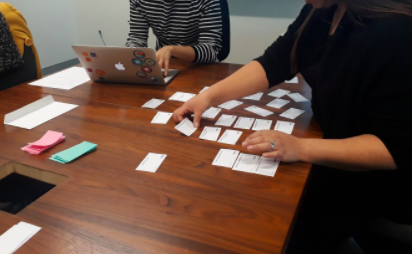
People participating in a card-sorting activity around a meeting table. One person arranges labelled cards into groups while another works on a laptop nearby. The activity is used to organise information and identify logical categories for content, navigation or information architecture.

Card sorting with one person sorting the cards into logical groups and the other making notes about the session.

Online sessions

Step 1: Explain why
Explain to your online participants why they have been selected for the session.

Step 2: Explain the reason
What is the reason for the card sort? For example, you might use card sorting to improve or work out the navigation of a website. The words on the cards represent the menu options/page titles.

Step 3: Explain the words
Explain that the words on the cards represent the menu options/page titles on the site.

Step 4: Image and questions
After you receive the results of their session, send them an image of it to discuss. Ask them questions about what kinds of content they think will sit under those headings

Follow up

Analysing the card sorting results is an important part of what you will do with this data. You are looking for patterns and insight into people’s mental models. Your analysis will depend on how much time you have.

Look for common groupings from each card sorting session.

Note level 1 categories, order, rank, what is discarded and added.

You can also conduct further testing with tree-testing software to help improve the user experience of your website.

Your synthesis may take from 2 hours to 1 day, depending on the size of the website or section.

L&D Groups
Set the foundations
L&D Categories
Content Strategy Guide
Was this page helpful?
Last updated
25 September 2026

Acknowledgement of Country

The APS Academy acknowledges the Traditional Custodians of Country throughout Australia and recognises the continuing connection to lands, waters and communities.
We pay our respect to Aboriginal and Torres Strait Islander cultures and to Elders both past and present.

Museum of Australian Democracy
Old Parliament House 
Parkes 2600

APSLearn terms & conditions

About us

apsacademy@apsc.gov.auContact us
ABN: 99 470 863 260 
  • LinkedIn - external site - external site - external site

Help us improve

We are always looking for ways to improve the user experience of our website

 Share your thoughts

  • © 2021 APS Academy. All rights reserved.
  • FOI
  • Privacy Policy 
  • Terms of use
  • Accessibility
Back to top