Skip to main content Skip to main navigation
Australian Public Service Academy Australian Public Service Academy Australian Public Service Academy Australian Public Service Academy logo

APSLearn logo

APSLearn Login

APS Professions logo
Professions MCP Portal

Main navigation

  • APS Craft

    APS Craft

    • Integrity
    • Working in Government
    • Engagement & Partnership
    • Implementation & Services
    • Strategy, Policy & Evaluation
    • Leadership & Management
  • APS Professions

    APS Professions

    • Complex Project Management Profession
    • Data Profession
    • Digital Profession
    • Evaluation Profession
    • HR Profession
    • Procurement and Contract Management Profession
  • APS People

    APS People

    • Diversity and Inclusion
    • Health and Wellbeing
    • Work Health and Safety
    • Your APS Career
  • APS Induction
  • Learning Experiences

    Learning Experiences

    • Courses
    • Course session dates
    • Microcredentials
    • Events
    • Resources
    • Cross Agency Training Hub
    • Nationwide course sessions
    • SES Executive Coaching
  • Our Services

    Our Services

    • APSLearn
    • APS Academy course offerings
    • APS Academy Training Venues
    • Onboard learning experiences
    • Share and reuse learning experiences
  • Guides

    Guides

    • APS L&D Good Practice Guide
    • Learning Design and Administration
    • Learning Culture
    • The Learner and Career Development
    • Learning Technologies
    • Procurement in L&D
    • Evaluating Learning
    • L&D Search
    • Content Strategy Guide
  • News

    News

    • Academy News
    • MyAcademy
  • About us

    About us

    • About the APS Professions
    • Faculty
    • Learning approach
    • Contact
    • Supplier FAQ's

Plan your IA

You are here

  1. Home
  2. Learning Experiences
  3. Resources
  4. Plan your IA
  • Linkedin
  • Twitter
  • Facebook
  • Email
Print

Plan your information architecture's (IA) taxonomy, group your content, and visualize your IA.

When planning your IA:

  • organise it so that users can find what they're looking for
  • highlight content so that users can discover new things that are relevant to them
  • streamline the IA to make life simpler for everyone
  • test the IA to make sure it works

Build out your taxonomy

A taxonomy is a list of agreed terms and words that you can use to categorise content across your digital ecosystem. These words can help you decide what labels to use for your IA, as you structure content around it.

Some general types of taxonomy for IA can include terms like:

  • users
  • products
  • services
  • how-to tips
  • providers
  • publications

Organise your taxonomy into categories and then a hierarchy of related terms to use for your IA. It’s helpful to know what each term means and what it refers to.

Use methods like card sorting or keyword research to build out your taxonomy. Find out common terms and words from your subject experts and business objectives.

Group content

There is no rule about how you should group headings in your IA. Some helpful ways might be by subject, task or user types.

Subject-based IA

Group your information into the subjects you need to cover. For example:

  • aged care
  • single parents
  • families
  • residency
  • businesses

These examples will be different from agency to agency.

Task-based IA

Group your information into the tasks a user needs to achieve. For example:

  • applying for an ABN
  • updating or cancelling your ABN
  • applying for other registrations

User types-based IA

Group your information into types of users. For example:

  • individuals
  • businesses
  • tax professionals etc.

Consider using this approach for behavioural rather than demographic groupings. For example, ‘buyers and suppliers’ rather than ‘parents, children, adolescents’. If you are considering demographic groupings, test this out with users first.

The larger and deeper an IA is, the harder it is for users to navigate and the harder it is to maintain. It can also cause search issues if important content is buried deep in a site.

Australian Taxation Office, 2017

Visualise your IA

Use a visual tool or site map to visualise your IA as you develop it. This is also useful to show stakeholders.

Where an IA is deep and there are hundreds of pages, use additional tools to map the complete IA. The most available option is to map your full IA using a spreadsheet.

When visualising, consider using a basic linking, interlinking or deep-cross linking IA.


Basic IA


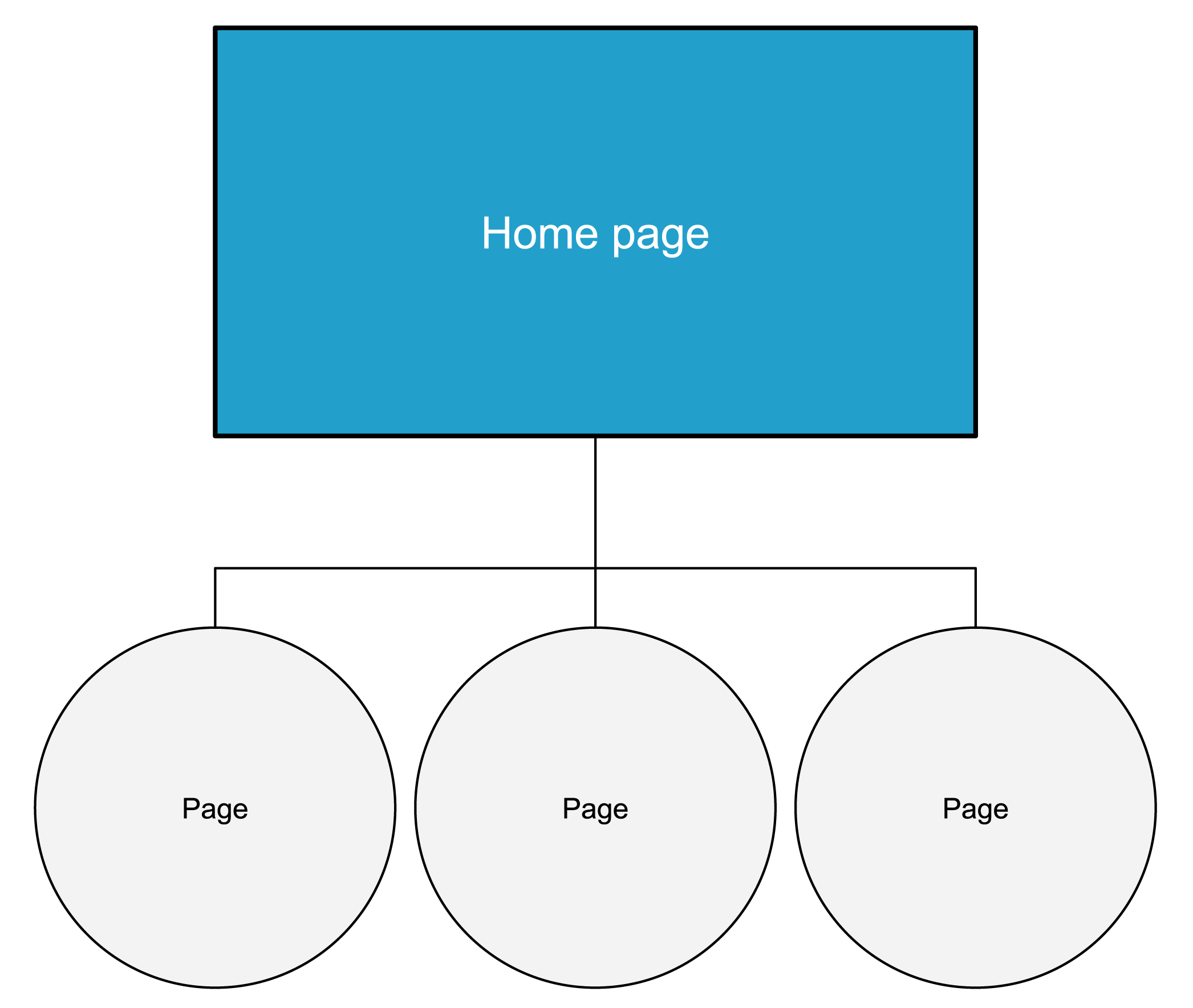
A basic, commonly used IA structure with parent and child pages.
Basic information architecture diagram showing a hierarchical website structure. A Home page sits at the top and connects to three subordinate pages beneath it, illustrating a simple parent-child relationship used to organise website content and navigation.

This basic IA structure shows a page hierarchy with the parent page at the top and the child pages coming out of that below.


Interlinking IA


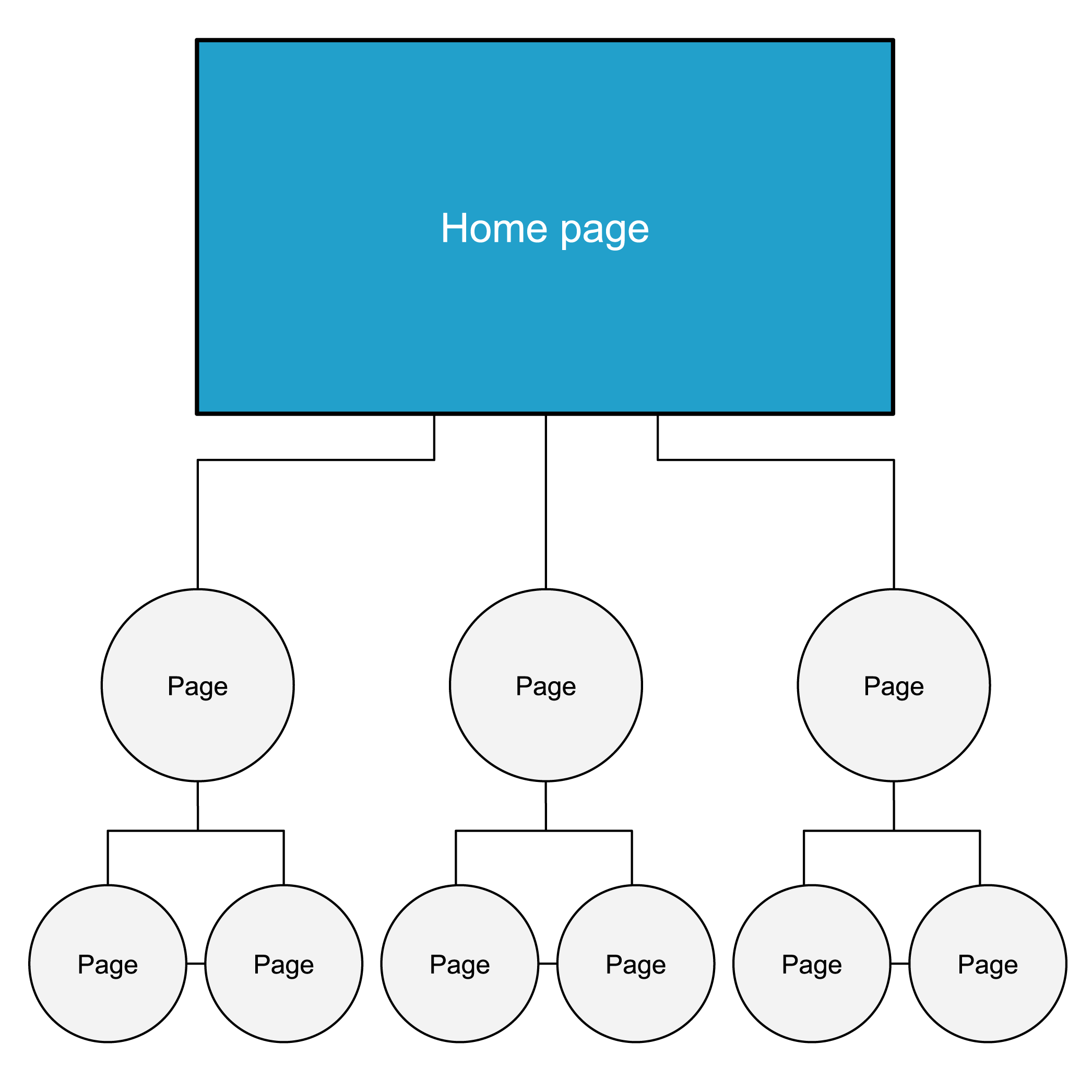
An interlinking IA is useful for sites with a lot of overlapping content. The top level page has sub pages (parent page) and child pages. The child pages are interlinked.
Information architecture diagram showing a hierarchical website structure with interconnected pages. A Home page sits at the top and connects to three main pages. Each main page has two child pages beneath it, with horizontal links between related child pages. The diagram illustrates both hierarchical navigation and cross-linking between content areas to improve user pathways and content discovery.

This interlinking IA structure shows a page hierarchy that includes parent pages out of the main page and then child pages coming out of those parent pages. There are connections vertically down the hierarchy, but also horizontal ones that connect the child pages.


Deep cross-linking IA


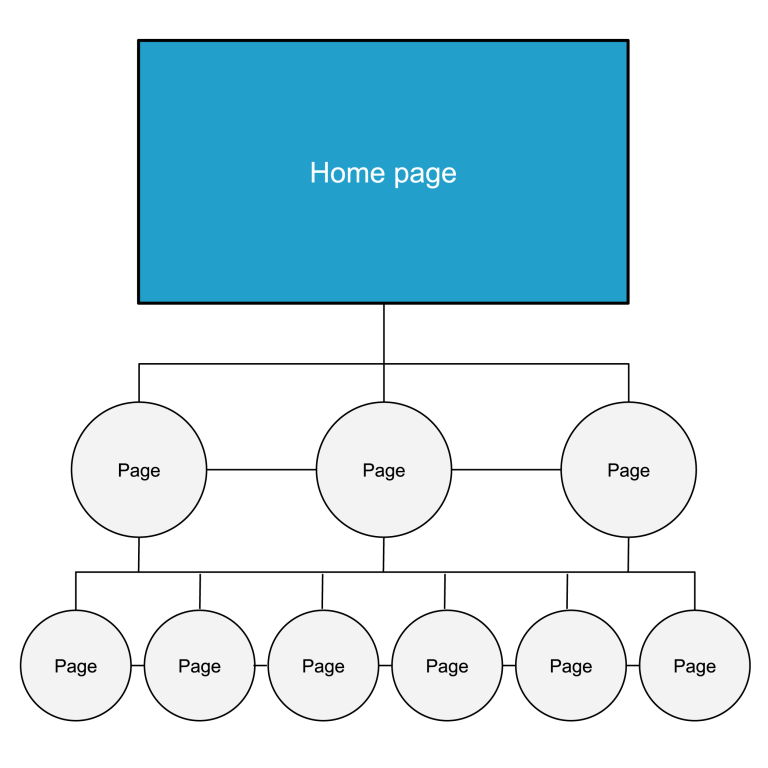
Parent, child and grandchild pages, accessible from multiple levels.
Information architecture diagram showing a website structure with extensive cross-linking between pages. A Home page sits at the top and connects to three main pages, which in turn connect to six lower-level pages. Horizontal links connect pages at both levels, creating multiple pathways between related content. The diagram illustrates a highly interconnected website structure designed to support navigation, content discovery and user journeys across different sections.

This deep cross-linking IA structure shows a complex page hierarchy. The parent page sits at the top and out of this flows both child and then grandchild pages. In this structure their are connections vertically down through each level but also horizontally across the pages. There is a lot of interconnectivity.

L&D Section
Improve your IA
L&D Groups
Set the foundations
L&D Categories
Content Strategy Guide
Was this page helpful?
Last updated
25 September 2026

Links & Downloads

Information architecture 101: techniques and best practices

Acknowledgement of Country

The APS Academy acknowledges the Traditional Custodians of Country throughout Australia and recognises the continuing connection to lands, waters and communities.
We pay our respect to Aboriginal and Torres Strait Islander cultures and to Elders both past and present.

Museum of Australian Democracy
Old Parliament House 
Parkes 2600

APSLearn terms & conditions

About us

apsacademy@apsc.gov.auContact us
ABN: 99 470 863 260 
  • LinkedIn - external site - external site - external site

Help us improve

We are always looking for ways to improve the user experience of our website

 Share your thoughts

  • © 2021 APS Academy. All rights reserved.
  • FOI
  • Privacy Policy 
  • Terms of use
  • Accessibility
Back to top