Skip to main content Skip to main navigation
Australian Public Service Academy Australian Public Service Academy Australian Public Service Academy Australian Public Service Academy logo

APSLearn logo

APSLearn Login

APS Professions logo
Professions MCP Portal

Main navigation

  • APS Craft

    APS Craft

    • Integrity
    • Working in Government
    • Engagement & Partnership
    • Implementation & Services
    • Strategy, Policy & Evaluation
    • Leadership & Management
  • APS Professions

    APS Professions

    • Complex Project Management Profession
    • Data Profession
    • Digital Profession
    • Evaluation Profession
    • HR Profession
    • Procurement and Contract Management Profession
  • APS People

    APS People

    • Diversity and Inclusion
    • Health and Wellbeing
    • Work Health and Safety
    • Your APS Career
  • APS Induction
  • Learning Experiences

    Learning Experiences

    • Courses
    • Course session dates
    • Microcredentials
    • Events
    • Resources
    • Cross Agency Training Hub
    • Nationwide course sessions
    • SES Executive Coaching
  • Our Services

    Our Services

    • APSLearn
    • APS Academy course offerings
    • APS Academy Training Venues
    • Onboard learning experiences
    • Share and reuse learning experiences
  • Guides

    Guides

    • APS L&D Good Practice Guide
    • Content Strategy Guide
  • News

    News

    • Academy News
    • MyAcademy
  • About us

    About us

    • About the APS Professions
    • Faculty
    • Learning approach
    • Contact
    • Supplier FAQ's

Top tasks

You are here

  1. Home
  2. Learning Experiences
  3. Resources
  4. Top tasks
  • Linkedin
  • Twitter
  • Facebook
  • Email
Print

Why understand top tasks of users?

Listing top tasks will make you think, discuss and prioritise the main reasons users are visiting your website. Prioritise these tasks to meet the greatest number of user needs.

Prep time People Run time
2 hours 2 to 15 4 hours

Preparation

Materials

Find what works best for you and your team. You might want to group around a blank wall space and list the tasks on post-it notes and stick them to the wall.

The scope of your top tasks activity depends on your team's needs, time and budget. For a large scale project, it’s best to get guidance from an experienced user researcher, service designer or specialist in this area.

  • Post-it notes
  • Markers
  • Whiteboard, wall space or butcher's paper

How to discover top tasks

Step 1: Research user tasks

Use information you already have to find the top tasks for people using your website. Or use data from:

  • frontline staff feedback
  • surveys to staff and users
  • social media
  • interviews with stakeholders to find out what they consider to be user top tasks
  • similar websites (to see their top tasks)
  • site behaviour analysis
  • search analysis

You may not have content for top tasks yet. Any research into your website analytics may show the current state, but not what might be missing.

Step 2: List your tasks

Create a list of all the website tasks, for example:

  • lodge a tax return
  • register a business
  • contact the department

Keep tasks broad, gender-neutral and free of demographics. Avoid bias.

Your first top tasks list will likely be very long. If you are short on time and people, create a list for a section of your website.

Step 3: Refine your task list

You can refine your list with your stakeholders. Reduce it to under 100 tasks by removing:

  • duplicates
  • high-level


Step 4: Get users to vote


Once you have created your top task shortlist send it out to users to vote. You can do this by emailing a survey to a group of users. Ask them to vote on their top 5 tasks in order of preference.

This exercise will generally reveal patterns and show the most important tasks. It will help you prioritise content development and improvement to make sure users can complete these tasks.

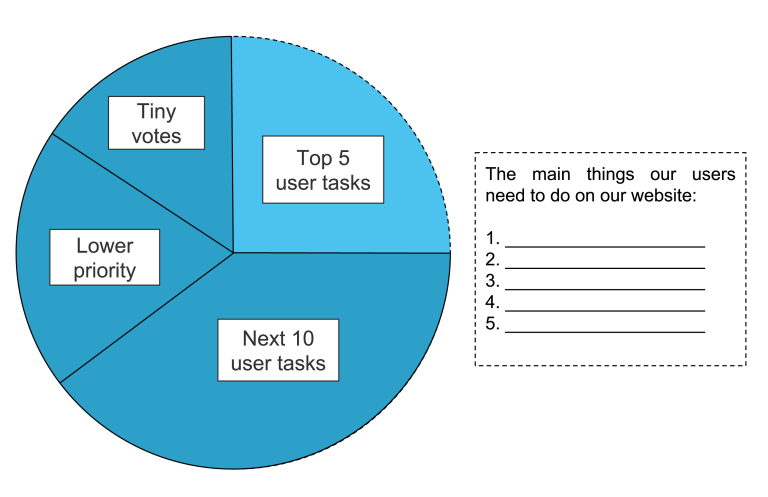
Pie chart illustrating a content prioritisation model based on user tasks. The chart is divided into four segments labelled Top 5 user tasks, Next 10 user tasks, Lower priority and Tiny votes. A text box alongside the chart lists the five most important tasks users need to complete on a website. The diagram demonstrates how user needs can be prioritised to guide content and website design decisions.

This pie chart is divided into the main things users want to do on your agency’s website. The segments include the top 5 user tasks, next 10 user tasks, lower priority, and tiny votes. The focus here is on the top 5 things users need to do on our website.

Follow up

Assess your top tasks regularly through content testing, usability testing and analytics. There are many ways to measure content success.

Maintain your top tasks list so that it is prioritised correctly.

Create a visual of the top tasks your users need to do when interacting with your agency online.

L&D Groups
Research and analyse
L&D Categories
Content Strategy Guide
Was this page helpful?
Last updated
24 September 2026

Links & Downloads

Gerry McGovern:
What really matters: focusing on top tasks
Identifying customer top tasks

Acknowledgement of Country

The APS Academy acknowledges the Traditional Custodians of Country throughout Australia and recognises the continuing connection to lands, waters and communities.
We pay our respect to Aboriginal and Torres Strait Islander cultures and to Elders both past and present.

Museum of Australian Democracy
Old Parliament House 
Parkes 2600

APSLearn terms & conditions

About us

apsacademy@apsc.gov.auContact us
ABN: 99 470 863 260 
  • LinkedIn - external site - external site - external site

Help us improve

We are always looking for ways to improve the user experience of our website

 Share your thoughts

  • © 2021 APS Academy. All rights reserved.
  • FOI
  • Privacy Policy 
  • Terms of use
  • Accessibility
Back to top