





APS Career Pathfinder

APS Career Pathfinder is a career exploration and workforce capability tool that helps people discover career opportunities across the Australian Government. It supports current APS employees, people considering a career in government, and organisations seeking to build capability in priority workforce areas. The tool enables users to explore roles, understand skill requirements, identify development opportunities and plan future career pathways through a skills-based approach.
The platform was developed through consultation with government and industry to identify the critical and desirable skills required for approximately 200 APS roles. It uses the Skills for the Information Age (SFIA) framework and the Data Capability Framework (DCF), with learning resources mapped by Services Australia.
APS Career Pathfinder can help you explore your next career step, whether you are looking to progress within the APS, transition to a different role, develop new skills or consider opportunities in government.
About APS Career Pathfinder
This tool is part of our strategy to attract and develop digital talent for the APS and Commonwealth. We consulted with industry and government to identify the critical and desirable skills for 200 roles in the APS.
The tool uses the SFIA (Skills for the Information Age) framework and the DCF (Data Capability Framework) with a learning resource catalogue mapped by Services Australia. The tool can utilise other frameworks and catalogues.
The tool can also be modified and tailored to meet your organisation needs. If you are interested in using this tool, contributing to its development, or want to know how it can be tailored to meet your organisation's needs, please contact us a careerpathfinder@dta.gov.au.
Benefits
- Explore roles that align with your existing skills.
- Discover career options based on your interests.
- Understand the skills and capabilities required for different roles.
- Identify skills you may need to develop for future career aspirations.
- Access learning and development opportunities mapped to identified skill gaps.
- View role descriptions and insights into what particular roles involve.
- Discover APS employment opportunities through links to APSJobs.
- Understand which roles and capability areas are currently in high demand.
Using the tool
How to use APS Career Pathfinder
Users can create a skills profile within the platform. If they choose to make their profile discoverable and indicate they are open to opportunities, authorised HR practitioners may identify them for projects, taskforces or other workforce opportunities that align with their skills and experience.
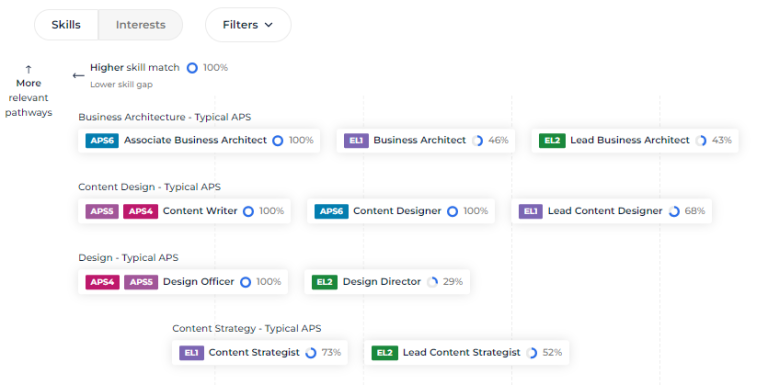
You can find roles that match your skills
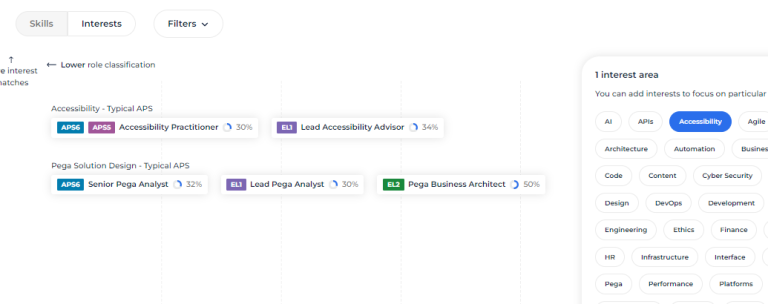
Or roles that match your interest
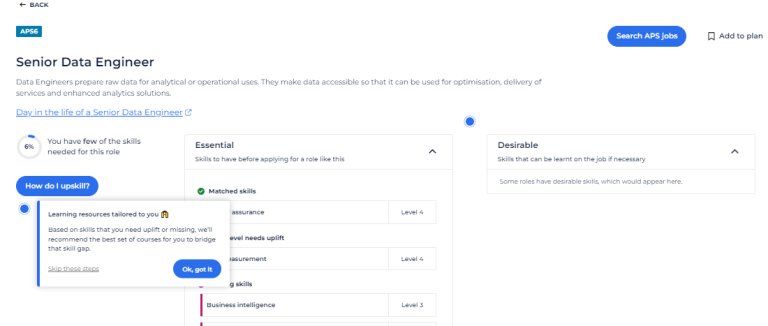
You can see what skills you need and how to get them. The tool shows you:
- descriptions of what the role does, in some case there are profiles of people doing jobs with that role now
- details of the required skills
- training specific to your skill needs
- APSJobs to show you available jobs.
Get offered opportunities
You can use APS Career Pathfinder privately, but if you are open to being contacted about opportunities you can:
- login to APS Career Pathfinder
- tell it the skills you have
- select the option ‘I’m open to opportunities’.
This will let authorised HR managers from other agencies find you when they are searching for people with certain skills. They may be looking for people to form a taskforce or project team. If you have the skills they are looking for, they may contact you to discuss the opportunity.
Employers
APS Career Pathfinder provides employers with a practical way to understand workforce capability requirements and support employee development.
- Review role requirements, including desirable and required skills at different levels.
- Support workforce planning and position design.
- Identify skill gaps and development opportunities for staff.
- Assist with performance and capability development conversations.
- Encourage employees to explore future career pathways and create development plans.
- Locate employees with particular skills through authorised talent search functionality.
Find skills in your organisation
If you are looking for people with certain skills in your organisation, please contact your HR team first. If they do not already have a HR manager who is authorised to search APS Career Pathfinder, they can contact us at careerpathfinder@dta.gov.au.
Workforce planners
APS Career Pathfinder supports workforce planning through access to de-identified workforce capability information. Agencies can use this information to better understand existing capability, identify workforce strengths and capability gaps, and make informed decisions about future workforce investment.
The platform also supports broader talent management activities by providing insights into workforce skills and helping agencies better understand the skills profile of their organisation.
Agency workforce planners can obtain access by contacting us at careerpathfinder@dta.gov.au.
Supporting APS capability development
The use of APS Career Pathfinder is referenced within the APS Data, Digital and Cyber Workforce Plan 2025-30 as a mechanism to support talent development across the APS and Commonwealth. The tool helps agencies strengthen capability in priority workforce disciplines and supports a more skills-based approach to workforce development.
Tailoring the platform
APS Career Pathfinder can be adapted to support organisational workforce needs. The platform can utilise additional frameworks and learning catalogues and may be tailored to meet specific agency requirements. Agencies interested in contributing to the tool's development or exploring customisation options can engage directly with the platform administrators.
APS Career Pathfinder brings together career planning, capability development, learning resources and workforce insights in a single platform. By connecting people, skills, learning and opportunities, it helps individuals make informed career decisions while supporting agencies to build the capability needed for the future APS workforce.
Updates to APS Career Pathfinder
APS Career Pathfinder continues to evolve, with recent updates focused on improving user experience, accessibility and workforce capability management.
August 2026 updates
We’ve updated all roles to SFIA9. We’ve made the 'Create account' and login process easier. We've also added a new filter (Discipline) so you can see or share a linear career progression.
December 2025 updates
Release update for individual users (public version)
We’ve added some changes to make creating your skill profile easier. We’re also continuing to improve the accessibility and user experience so everyone can plan their career in the APS.
See where different skills can lead you
Our new Skills playground function lets you see which skills will give you the best career options. You can play with various skills without impacting your saved skills profile (if you created one).
User experience and accessibility
We have put a lot of effort into improving accessibility, addressing issues such as:
- colour contrast
- keyboard navigation
- zoom/resizing behaviour on desktops, mobile devices and tablets.
Release update for individual users (in an agency partition)
Improved skill suggestions
When enabled by your agency, an updated AI assistant supports two functions that provide skill suggestions:
- A chat function where you can tell the AI about your work history
- A scan text function to read pasted or uploaded text. This could be also used to read job statements or learning materials to assist with the mapping process.
Note: If your agency does not have this function enabled, you can use it in the public version.
See where different skills can lead you
Our new Skills playground function lets you see what interesting career options would come up if you had certain skills, without having to change your saved skills profile.
Get your skills verified and/or certified
When the verification and certification function is enabled by your agency, you will be able to request verification (by a peer) and certification (by a skills assessor) of your skills, with simple bulk actions and mobile-friendly dashboards.
This provides more evidence of your skills and also helps you stand out in a talent search.
Stand out in talent search
You can stand out in a talent search with a 300-word pitch, refreshed profile layout and updated icons that highlight verified and certified skills at a glance.
Verify colleagues' skills
When enabled, you will be able to receive requests to verify colleagues' skills. You can manage these requests in the Assessment centre.
Your agency may place restrictions on who you can/should request to verify your skills.
Release update for agency HR users
Get skills verified and assessed
Agencies with a partition can enable the verification and certification function. Staff can then request verification (peer endorsement) and certification (by a skills assessor) of skills directly in the platform, with simple bulk actions and mobile-friendly dashboards.
Skill verification can be done by anyone in the agency. Agencies nominate who can be an assessor and which skill frameworks they can assess against. Assessors can nominate which skills they are competent to assess.
Verifications and assessments are managed in the Assessment centre, which is turned off by default.
See more about talent
Candidates can tell their story with a richer 300-word pitch. Search options enable you to filter candidates based on self-assessed, verified or certified skills. This allows talent searchers to get a better idea of the talent’s fit before contacting them.
Bulk skills analysis will also tell you more about the skills in your agency, including whether they are self-assessed, verified or certified, and how long that skill has been in their profile. These reports are anonymised but give you a better picture of the full talent in your agency.
See which skills can provide maximum benefit
Our new Skills playground function lets you see which skills impact the most roles and can assist in prioritising training and development, and perhaps succession planning.
Agencies with partitions can have their Data Admin enable these functions. Talk to us to find out more via email careerpathfinder@dta.gov.au.
Talk to us about getting a partition for your agency, email careerpathfinder@dta.gov.au.