Skip to main content Skip to main navigation
Australian Public Service Academy Australian Public Service Academy Australian Public Service Academy Australian Public Service Academy logo

APSLearn logo

APSLearn Login

APS Professions logo
Professions MCP Portal

Main navigation

  • APS Craft

    APS Craft

    • Integrity
    • Working in Government
    • Engagement & Partnership
    • Implementation & Services
    • Strategy, Policy & Evaluation
    • Leadership & Management
  • APS Professions

    APS Professions

    • Complex Project Management Profession
    • Data Profession
    • Digital Profession
    • Evaluation Profession
    • HR Profession
    • Procurement and Contract Management Profession
  • APS People

    APS People

    • Diversity and Inclusion
    • Health and Wellbeing
    • Work Health and Safety
    • Your APS Career
  • APS Induction
  • Learning Experiences

    Learning Experiences

    • Courses
    • Course session dates
    • Microcredentials
    • Events
    • Resources
    • Cross Agency Training Hub
    • Nationwide course sessions
    • SES Executive Coaching
  • Our Services

    Our Services

    • APSLearn
    • APS Academy course offerings
    • APS Academy Training Venues
    • Onboard learning experiences
    • Share and reuse learning experiences
  • Guides

    Guides

    • APS L&D Good Practice Guide
    • Content Strategy Guide
  • News

    News

    • Academy News
    • MyAcademy
  • About us

    About us

    • About the APS Professions
    • Faculty
    • Learning approach
    • Contact
    • Supplier FAQ's

User profiles

You are here

  1. Home
  2. Learning Experiences
  3. Resources
  4. User profiles
  • Linkedin
  • Twitter
  • Facebook
  • Email
Print

Why create user profiles?

User profiles are a way for you to share information about the people you have conducted research with. Research must inform the creation of your user profiles. This is because research will challenge your own assumptions and biases about who your users are.

Prep time People Run time
10 minutes 1 or more 1 to 4 hours

Preparation

Materials

As a user researcher you will be applying the insights you’ve gained from user research. Invite any other team members who attended user research to join you in creating a user profile.
  • Markers
  • Whiteboard
  • Post-it notes
  • Template

How to create user profiles

Your profiles will represent the shared experiences of a group of users. You should bring together user attitudes and behaviours in relation to a product or service. You can also include demographic information about the individual.

You can present your user profiles in a range of different ways using content that is relevant to the project. Below are some examples of types of content.


User snapshot


Try to include:

  • a user quote that embodies their strongest need, for example, “just tell me what I need to do”.
  • (the product or service name): use a phrase to say what it means to them, for example 'a safety net'
  • known attitudes in relation to their interaction with the product or service. Use 5-6 bullet points in the user’s words.

Describe the context that hinders or influences their task, for example, do they need to comply with a legal or legislative requirement?

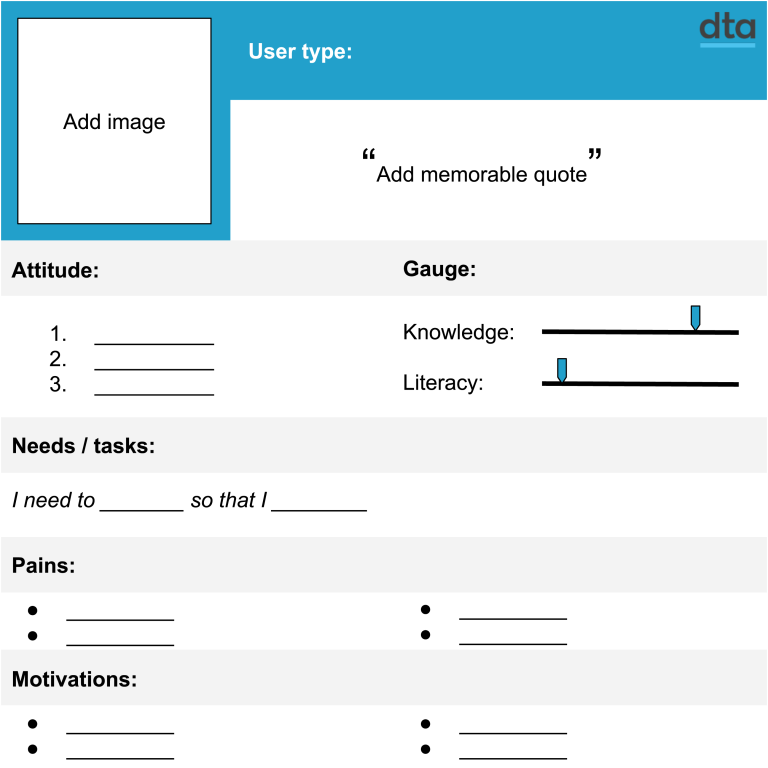
User persona template from the Digital Transformation Agency (DTA). The layout includes sections for user type, a memorable quote, attitudes, knowledge and literacy levels, needs and tasks, pain points, and motivations. The template is designed to capture user research insights and summarise key characteristics, behaviours and requirements of a target audience.

Create a user type or user profile. To begin, add a relevant image and a memorable quote that relates to this user. Describe the attitude of the user, their knowledge and literacy levels. Define what task they need to do. Describe their pain points and motivations.

A user characteristics gauge (in relation to the product or service)

Depending on the nature of the project you are working on, you may like to include a characteristics gauge. This will allow you to easily see the differences between each of your different profiles. The gauge can be a simple line that rates a participant from low to high. You can add the characteristics depending on what is relevant to your project. Here are a few examples.

  • Knowledge or expertise
  • Level of interest
  • Context of interest
  • Breadth of usage
  • Experience in related task
  • Digital literacy/format preference

Build on your profile by answering questions about their needs, pain points, risks and motivation.

Needs/tasks

What does the user need to do or find? What tasks do they do which are relevant to your project? The need will be goals that are aligned to an outcome.

Pain points

What are the obstacles that prevent them from being able to do the task? Are they being informed well enough? What other factors are preventing them from getting the task done?

Risks

What could go wrong if they can’t do the task or find the information? What is the impact of any implication–personal, financial etc.

Motivation

Why does the user want to complete the task? How is successful completion of the task going to affect them?

Follow up

Communicate your user profiles with the team. Profiles are valuable to ensure that what you are building or designing meets a user need. They are a reminder to your team and to stakeholders of who you are designing for.

User profiles are one part of the toolkit that you can use to communicate your research. You should ensure that you research any design decisions you make based on your profiles. Use other methods to do this, such as concept testing and usability testing.

L&D Groups
Research and analyse
L&D Categories
Content Strategy Guide
Was this page helpful?
Last updated
24 September 2026

Acknowledgement of Country

The APS Academy acknowledges the Traditional Custodians of Country throughout Australia and recognises the continuing connection to lands, waters and communities.
We pay our respect to Aboriginal and Torres Strait Islander cultures and to Elders both past and present.

Museum of Australian Democracy
Old Parliament House 
Parkes 2600

APSLearn terms & conditions

About us

apsacademy@apsc.gov.auContact us
ABN: 99 470 863 260 
  • LinkedIn - external site - external site - external site

Help us improve

We are always looking for ways to improve the user experience of our website

 Share your thoughts

  • © 2021 APS Academy. All rights reserved.
  • FOI
  • Privacy Policy 
  • Terms of use
  • Accessibility
Back to top