





User and job stories
Why create user and job stories?
Your stories will help to build out the foundations for defining iterations and services that lead to creating content.
| Prep time | People | Run time |
| 30 minutes | 1 to 4 | 30 minutes |
Preparation |
Materials |
|
You'll need to know:
This data will be in your user research findings. |
|
How to create user job stories
Step 1: Use pain points to write your stories
Once you have collected your user pain points you can write your stories in response to them. Jot them on an index card so you can visualise and group your stories.
The most common format for a user story is:
- As a … (who is the user: be as specific as possible)
- I want to / need to … (what task is the user trying to do)
- So that … (why does the user want to do this task and what is their goal)
For example:
- As a young person entering the workforce for the first time
- I need to know what I should be getting paid (minimum wage)
- So that I can negotiate/check this with my employer
Step 2: Start broad, then get detailed
Keep your stories simple, focused, concise and active. Begin with broad stories by focusing on the overall goal. Then gradually break this down to create stories that reflect an individual task.
For example, an overarching story might be:
- As a content designer
- I need to create user-centred content
- So that my content meets a user need
A more detailed task-based user story under this could be:
- As a content designer
- I need to understand readability requirements
- So that my content is clear and accessible to people with low literacy levels
Step 3: Work out if you need job stories
Job stories can be used when you have the same user/s for each story and your stories are starting to sound repetitive. A job story helps you create more detail.
Job stories follow the format:
- When … (what situation is the user in)
- I want to … (what is the user trying to do or need)
- So … (what is the user’s goal)
For the readability example above, the user is a content designer and the job story could be:
- When I am creating content
- I want my content to be written simply
- So that people with lower literacy levels can understand it
Step 4: Write acceptance criteria
Write acceptance criteria on the back of your index cards to measure how your content meets a user or job story. When you meet the acceptance criteria you have completed the story.
For our readability example in the user story above, acceptance criteria might be that:
- content is in plain English
- content was tested with a readability tool and scored between a Year 5 (around age 9) and Year 9 (around age 13) reading level
- content is tested for comprehension with users Acceptance criteria should state a high-level intent, rather than a solution. Use acceptance criteria to test your content and measure performance.
Step 5: Map your stories
Map your user story cards in a tree format. Start with the broad overarching stories at the top of the tree and then map more specific user needs below this.
Group related tasks together so you can visualise how the content may fit together to meet a certain need.
Mapping your needs will also help you outline your minimum viable product (MVP). This shows the minimum stories you need to work to for the content to meet the overall goal.
By prioritising content this way, you can create an MVP for testing. Everything not prioritised can go in your backlog to work on later.
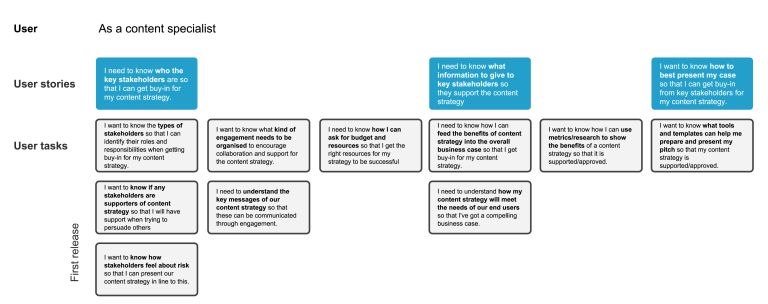
This is the user story of a content specialist. Highlights what the user needs to know (their pain points), and what the related tasks are that they're trying to achieve.
Step 6: Write content to match your user stories
Once you have a detailed story map you can create content that aligns with your stories.
Traditionally, in an Agile team, developers use user stories to create tasks for each sprint. User stories can also help provide the structural outline to your content.
Your content should meet the acceptance criteria for a story. This is so your content meets a user need.\
Get your team to practise writing user stories to begin to change their way of thinking. This will help them understand content design and to put the user first.
Follow up
Use your user stories to align the team and work towards the same goal.
Share user stories with stakeholders to remind them of the user need behind the content, and the content’s purpose. You can use user stories to get empathy, trust and buy-in from decision makers.
While you’re creating content, keep referring back to your story map to stay on track and remember what the user needs to know.
Your user story map reflects a broader user journey. It may also show how you can ‘join up’ disconnected or contradictory content across different business areas.
Testing may highlight that your user stories or job stories need to be iterated. User needs change, so stories have to adapt to this.