





Learn about SEO terms
Search engines
A search engine is a tool that searches and scans website content across the internet. It then creates a database to display search results. The results match user search queries with the most relevant websites.
We use SEO to provide better information to search engines to get better search results.
Did you know?
The 5 most popular search engines in Australia are:
- Google (over 90% market share)
- Bing
- Yahoo
- Baidu (Chinese-based search engine)
- DuckDuckGo
Source: Search Engine Market Share Australia 2018
SERPs
SERP stands for search engine results page. These are the search results a user sees in a list, after they’ve done a search.
In a typical search, you’ll see both paid listings and organic listings. The SERP page will consist of 10 organic results. Each result will have at least:
- headline — known as a meta title or page title
- description — known as a meta description
- URL — the website page link itself
You can directly influence these 3 pieces of information to get better search results.
Some SERP results can also include extra information called rich snippets:
- navigation
- website headings
- names of people
- search bars
These may appear if your pages have been set up to maximise SEO.
Search engine results page (SERP) |
|
|
This image displays the organic search results for the search term 'tax returns'. It shows the top 3 positions out of about 33,000,000 results.
|
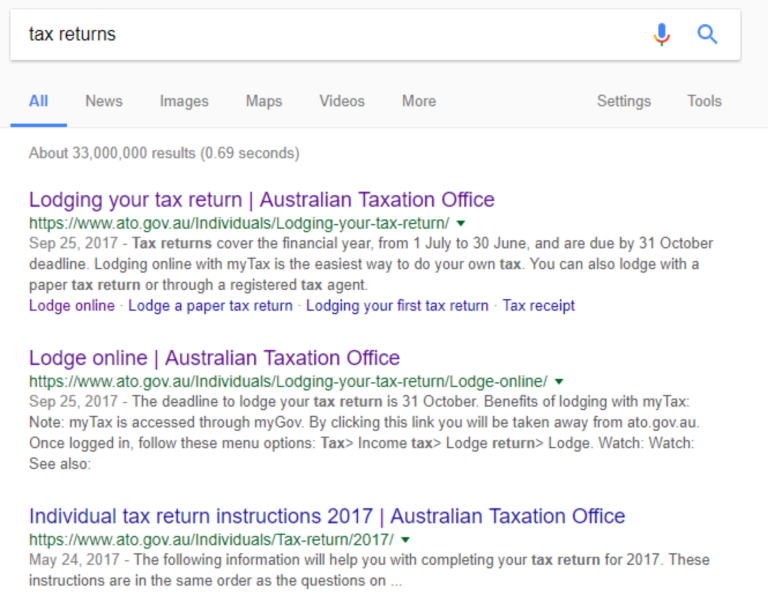
Top 3 organic results for the keyword search ‘tax returns’. |
Keywords
These are the most popular words and phrases that people use when searching on a particular topic. Keywords can also be known as search terms or search queries. Keywords should be part of your SEO strategy.
For example, if a popular search phrase is 'red car door', then that keyword phrase should feature in your content. See our Content Guide for more on how to do this.
Each time a user does a search, the results can vary, even on the same search done twice. Individual user’s browsing history, location and social media settings affect this. As you can't control these factors, you need to work on the quality of the content instead.
Organic and paid search |
|
|
The main search results are organic results (sometimes called natural results). These appear in a ranking order of highest to lowest. The only way to improve your ranking position is through better SEO. In the organic results, you may also see a:
Paid ads are not affected by your site's SEO. You can buy adds through Google's AdWords or Microsoft's Bing Ads. |

This screenshot shows 'Etax' as the paid Ad, followed by the first organic result 'Lodge online | Australian Taxation Office'. |
Rankings
This refers to the positions of the individual search results on a search engine results page.
Also known as keyword rankings, keyword rank, or rank. If for example, your listing has 2 other organic listings above it, it would have a keyword rank of 3.
Metadata
Metadata refers to different pieces of code often called ‘tags’. This data sits in the background of a webpage. It is usually not visible to users. It tells search engines and other sites about your pages (for example, LinkedIn).
Metadata can help control how search engines find and display your site in their results. The most common types of metadata that affect SEO are page titles and page descriptions. Use keyword research to guide writing metadata.
Schema
Schema is another type of metadata. It refers to a snippet of code that helps search engines understand your webpage better and rank it more highly.
Traffic
Traffic refers to the people who visit your site from a search results page or by typing in your URL address. These people are the 'users' of your information.
Backlinks and link checking
Backlinks (or inbound links) connect to your content from other websites. Search engines use these backlinks to help rank the quality of your content.
Backlinks may come from:
- other government agencies and departments
- trusted organisations
- businesses
- individuals (for, example a minister’s blog)
There are two components of a backlink. These are the ‘quality’ and the ‘quantity’. You want as many quality backlinks to your site as possible. Search engines read these as examples of the value of your content. If valuable sites are backlinking to your content, it shows that your content is valuable.
You want the backlinks to use the keywords that your users are searching with.
Link checking
Don't forget to regularly check your own page links. Broken links can affect the usability of your site which in turn will affect your SEO.
Bots (robots)
Bots are also called crawlers, web crawlers and spiders (for example, Googlebot). These programs browse your web pages and collect data from and about them.
Robots collect hundreds of pieces of information about each web page they visit. This data helps the search engine work out the best search result for each search.
Index and indexation
A search engine index is a huge database of pages and sites. Search engines use this index to make the organic search results.
Indexation is the process of finding the data and storing it. SEO helps search engines to find and list your website in search results.
Algorithms
Search engines follow mathematical rules called algorithms to decide what to show in the SERPs. These rules give relevance and authority to each page, to then give it a ranking. Your SEO activity can have a major effect on the data being used to rank your site.