





Card sorting
Card sorting will help to find the best way to group content for your information architecture (IA). In a card sorting session, you’ll find out what information makes sense to your users.
Why do a card sort?
Card sorting helps to:
- group items to form your IA
- understand how users would categorise labels
- decide whether to make your IA subject-based, task-based or based on user types
There are different types of card sorting activities. In each instance, you will create the cards first but you or your users may add to them during the process.
Open
This involves users sorting the cards into groups. There are no limits on the open card sort. New cards can be added at any level of the proposed structure.
Closed
This involves users sorting the cards into top-level categories you've created in advance.
Hybrid
This involves users sorting the cards into top-level categories you've created but they can also create their own. In a workshop setting, you might set a top-level structure but start by validating and refining that with the user group.
| Prep time | People | Run time |
| 2 hours to 1 day | 5 to 6 | 2 hours |
Preparation |
Materials |
|
|
How to run a card sorting session |
|
|
Step 1: Introduce the group Step 2: Explain the reason Step 3: Lay out the cards Step 4: Put people into pairs Step 5: Sort cards into groups Step 6: Move cards (if required) Step 7: Label Step 8: Make notes Step 9: Assess priorities Step 10: Ask questions |
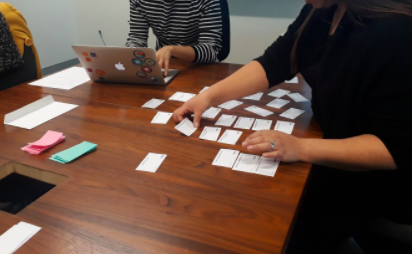
Card sorting with one person sorting the cards into logical groups and the other making notes about the session. |
Online sessions
Step 1: Explain why
Explain to your online participants why they have been selected for the session.
Step 2: Explain the reason
What is the reason for the card sort? For example, you might use card sorting to improve or work out the navigation of a website. The words on the cards represent the menu options/page titles.
Step 3: Explain the words
Explain that the words on the cards represent the menu options/page titles on the site.
Step 4: Image and questions
After you receive the results of their session, send them an image of it to discuss. Ask them questions about what kinds of content they think will sit under those headings
Follow up
Analysing the card sorting results is an important part of what you will do with this data. You are looking for patterns and insight into people’s mental models. Your analysis will depend on how much time you have.
Look for common groupings from each card sorting session.
Note level 1 categories, order, rank, what is discarded and added.
You can also conduct further testing with tree-testing software to help improve the user experience of your website.
Your synthesis may take from 2 hours to 1 day, depending on the size of the website or section.